Surround Camera Inoperative (SSM72248)
Reference number: SSM72248
SURROUND CAMERA INOPERATIVE
TECHNICAL SERVICE BULLETIN
| LAND ROVER: | LR4 / L319, Range Rover / L405, Range Rover Sport / L494 |
| CATEGORY: | Electrical |
SERVICE INFORMATION
Symptom 205000 Electrical Accessories
ISSUE
Content
A customer may report that one or more of the surround cameras are inoperative.
CAUSE
Poor connection at the camera module.
ACTION
Before consideration is given to appropriate camera replacement, please carry out the following steps:
- Connect Symptom Driven Diagnostics (SDD) to the vehicle and carry out a Diagnostic Trouble Code (DTC) read of the Image Processing Control Module (IPCM).
- If any of the following DTCs are present continue to next step:
DTC - 18 'Circuit current below threshold'
DTC - 31 'Signal failure'
DTC - 49 'Internal failure' are stored, continue to next step.
If none of the above DTCs are present continue with diagnosis using SDD and with reference to TOPIx.
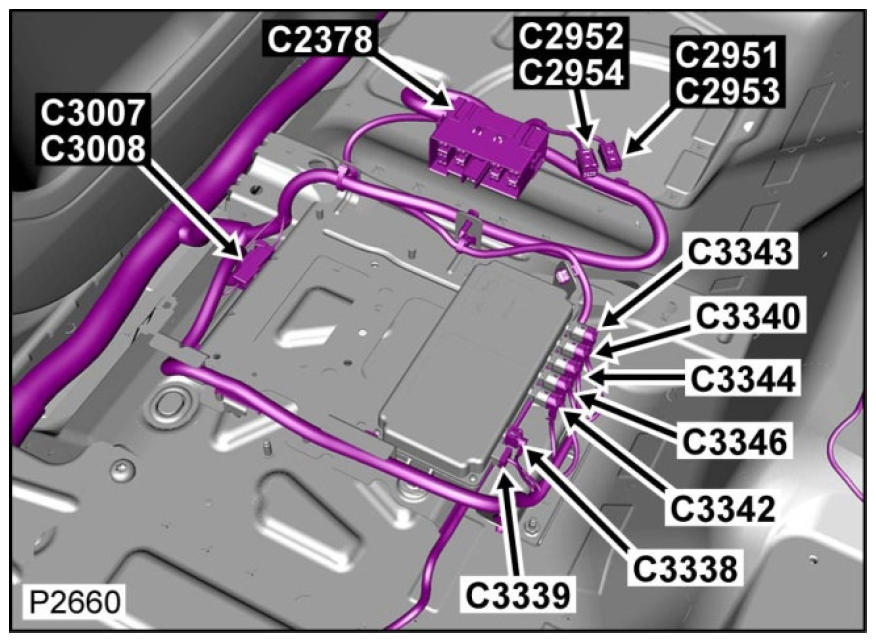
- Access the IPCM and disconnect and reconnect the appropriate camera electrical connection at the IPCM that is not functioning correctly. Please view the graphics below for connector location as follows:
LR4/Discovery 4 - IPCM located beneath Left Hand front Seat:
C3342 Grey Front Left Camera
C3346 Black Rear View Camera
C3344 Brown Left Mirror Camera
C3340 Green Front Right Camera
C3343 Blue Right Mirror Camera
Range Rover/Range Rover Sport - IPCM located adjacent to Left Hand Rear Seat Squab:
C3MP22D Grey Front Left Camera
C3MP22G Black Rear View Camera
C3MP22F Brown Left Mirror Camera
C3MP22A Green Front Right Camera
C3MP22 Blue Right Mirror Camera
- Clear the fault codes.
- Check all camera images for correct functionality and carry out a further fault code read of the IPCM.
If any of the DTCs have returned continue with diagnostics as guided by SDD and with reference to TOPIx to resolve the concern.
If the DTCs have not returned and one of more of the cameras are not functioning correctly, continue with diagnosis as guided by SDD and with reference to TOPIx.
If the DTCs have not returned and all camera images are displayed correctly return the vehicle to the customer.
Technicians - Please rate this SSM and provide comments so that future communications can be improved.
1 = Poor - Basic information provided - The SSM does not help me resolve the customer concern.
3 = Average - Adequate information provided - The SSM partially helps me resolve the customer concern.
5 = Excellent - All required information provided to resolve the customer concern.